
Introduction
WordPress Templates fit together like the pieces of a puzzle to generate the web pages on your WordPress site. Some templates (the header and footer template files for example) are used on all the web pages, while others are used only under specific conditions.What this article is about
This article seeks to answer the following question:Which template file(s) will WordPress use when it displays a certain type of page?
Who might find this useful
Since the introduction of Themes in WordPress 1.5, Templates have become more and more configurable. In order to develop WordPress themes, a proper understanding of the way WordPress selects template files to display the various pages on your blog is essential. If you seek to customize an existing WordPress theme, this article aims to help you decide which template file needs editing.Using Conditional Tags
WordPress provides more than one way to match templates to query types. WordPress Theme developers can also use Conditional Tags to control which templates will be used to generate a certain page. Some WordPress Themes may not implement all of the template files described here. Some Themes use conditional tags to load other template files. See the Conditional Tags page and "Query Based" in Theme Development for more information.The Template File Hierarchy
The General Idea
WordPress uses the Query String — information contained within each link on your website — to decide which template or set of templates will be used to display the page.First, WordPress matches every Query String to query types — i.e. it decides what type of page (a search page, a category page, the home page etc.) is being requested.
Templates are then chosen — and web page content is generated — in the order suggested by the WordPress Template hierarchy, depending upon what templates are available in a particular WordPress Theme.
WordPress looks for template files with specific names in the current Theme's directory and uses the first matching template file listed under the appropriate query section below.
With the exception of the basic index.php template file, Theme developers can choose whether they want to implement a particular template file or not. If WordPress cannot find a template file with a matching name, it skips down to the next file name in the hierarchy. If WordPress cannot find any matching template file, index.php (the Theme's home page template file) will be used.
Examples
If your blog is at http://example.com/blog/ and a visitor clicks on a link to a category page like http://example.com/blog/category/your-cat/: Here is the progression of how WordPress uses the template hierarchy to find and generate the right file.WordPress looks for a template file in the current Theme's directory that matches the category's ID.
- If the category's ID is 4, WordPress looks for a template file named category-4.php.
- If it is missing, WordPress next looks for a generic category template file, category.php.
- If this file does not exist either, WordPress looks for a generic archive template, archive.php.
- If it is missing as well, WordPress falls back on the main Theme template file, index.php.
- WordPress first determines whether it has a static front page. If a static front page has been set, then WordPress loads that page according to the page template hierarchy.
- If a static front page has not been set, then WordPress looks for a template file called home.php and uses it to generate the requested page.
- If home.php is missing, WordPress looks for a file called index.php in the active theme's directory, and uses that template to generate the page.
Visual Overview
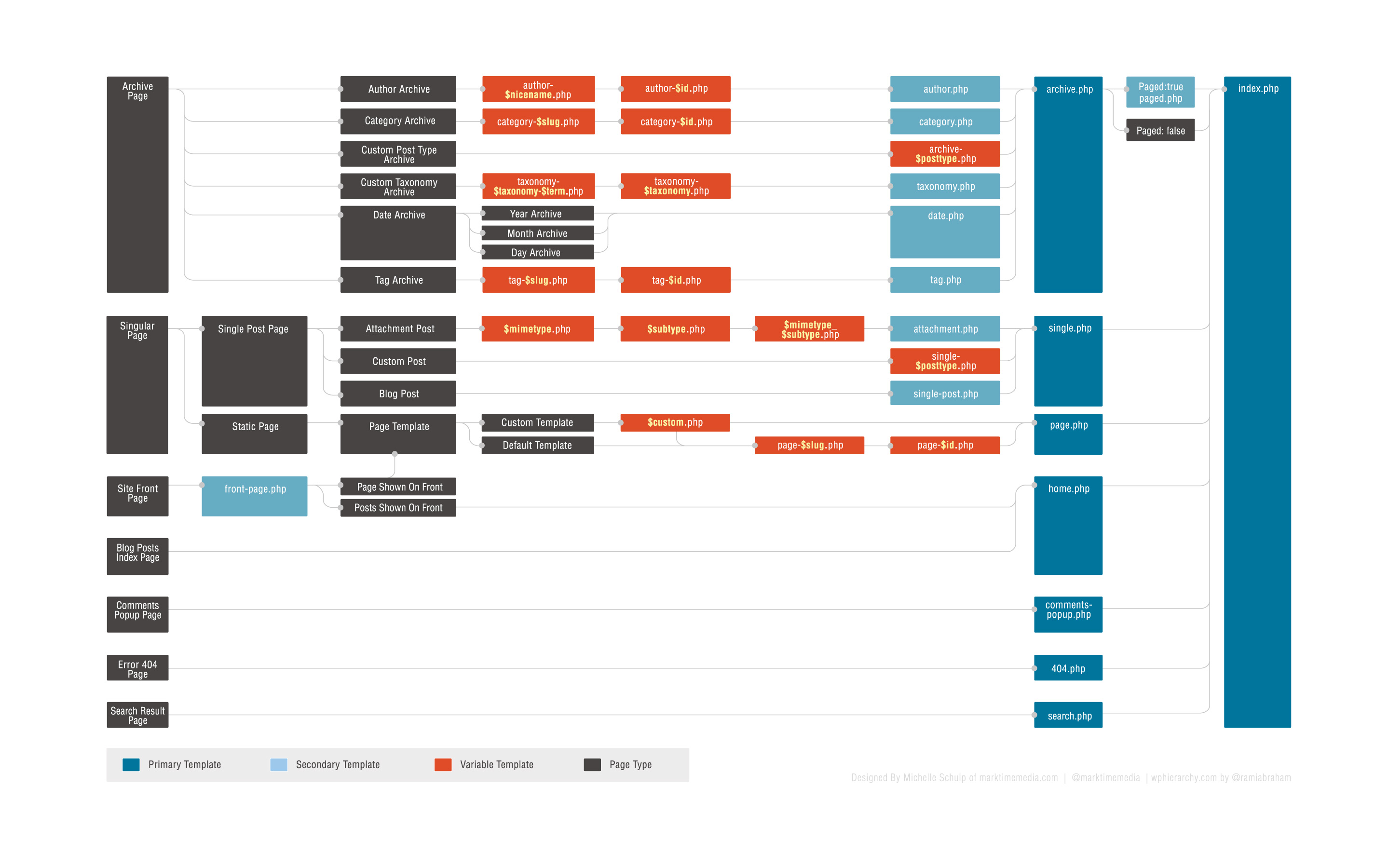
The following diagram shows which template files are called to generate a WordPress page based on the WordPress Template hierarchy. Full-Size Image (jpg) - Image courtesy Michelle Schulp at marktimemedia.com
View an interactive version
A more in depth hierarchy diagram, including template-related conditional tags and body CSS classes, can be found here.
WordCamp Minneapolis developed a poster with a more whimsical take on the template hierarchy. Download the PDF
The Template Hierarchy In Detail
The following sections describe the order in which template files are being called by WordPress for each query type.Home Page display
Template file used to render the Blog Posts Index, whether on the site front page or on a static page. Note: on the Site Front Page, the Front Page template takes precedence over the Blog Posts Index (Home) template.- home.php
- index.php
Front Page display
Template file used to render the Site Front Page, whether the front page displays the Blog Posts Index or a static page. The Front Page template takes precedence over the Blog Posts Index (Home) template.- front-page.php - Used for both Your latest posts or A static page as set in the Front page displays section of Settings -> Reading
- Page display rules - When Front page is set in the Front page displays section of Settings -> Reading
- Home Page display rules - When Posts page is set in the Front page displays section of Settings -> Reading
Single Post display
Template file used to render a single post page.- single-{post_type}.php - If the post type were product, WordPress would look for single-product.php.
- single.php
- index.php
Page display
Template file used to render a static page (page post-type)- custom template file - The Page Template assigned to the Page. See get_page_templates().
- page-{slug}.php - If the page slug is recent-news, WordPress will look to use page-recent-news.php
- page-{id}.php - If the page ID is 6, WordPress will look to use page-6.php
- page.php
- index.php
Category display
Template file used to render a Category Archive Index page- category-{slug}.php - If the category's slug were news, WordPress would look for category-news.php
- category-{id}.php - If the category's ID were 6, WordPress would look for category-6.php
- category.php
- archive.php
- index.php
Tag display
Template file used to render a Tag Archive Index page- tag-{slug}.php - If the tag's slug were sometag, WordPress would look for tag-sometag.php
- tag-{id}.php - If the tag's ID were 6, WordPress would look for tag-6.php
- tag.php
- archive.php
- index.php
Custom Taxonomies display
Template file used to render the Archive Index page for a Custom Taxonomy- taxonomy-{taxonomy}-{term}.php - If the taxonomy were sometax, and taxonomy's term were someterm WordPress would look for taxonomy-sometax-someterm.php. In the case of Post Formats, the taxonomy is 'post_format' and the terms are 'post_format-{format}. i.e. taxonomy-post_format-post-format-link.php
- taxonomy-{taxonomy}.php - If the taxonomy were sometax, WordPress would look for taxonomy-sometax.php
- taxonomy.php
- archive.php
- index.php
Custom Post Type Archive display
Template file used to render the Archive Index page for a Custom Post Type- archive-{post_type}.php - If the post type were product, WordPress would look for archive-product.php.
- archive.php
- index.php
Author display
Template file used to render an Author Archive Index page- author-{nicename}.php - If the author's nice name were rami, WordPress would look for author-rami.php.
- author-{id}.php - If the author's ID were 6, WordPress would look for author-6.php.
- author.php
- archive.php
- index.php
Date display
Template file used to render a Date-Based Archive Index page- date.php
- archive.php
- index.php
Search Result display
Template file used to render a Search Results Index page- search.php
- index.php
404 (Not Found) display
Template file used to render a Server 404 error page- 404.php
- index.php
Attachment display
Template file used to render a single attachment (attachment post-type) page- {MIME_type}.php - it can be any MIME type (image.php, video.php, application.php). For text/plain, in order:
- text.php
- plain.php
- textplain.php
- attachment.php
- single-attachment.php
- single.php
- index.php
- {MIME_type}.php - it can be any MIME type (image.php, video.php, application.php). For text/plain, in order:
Filter Hierarchy
The WordPress templates system allow you to filter the hierarchy. The filter (located in the get_query_template() function) uses this filter name: "{$type}_template" where $type is the a file name in the hierarchy without the .php extension.Full list:
- index_template
- 404_template
- archive_template
- author_template
- category_template
- tag_template
- taxonomy_template
- date_template
- home_template
- front_page_template
- page_template
- paged_template
- search_template
- single_template
- text_template, plain_template, text_plain_template (all mime types)
- attachment_template
- comments_popup
Example
For example, let's take the default author hierarchy:- author-{nicename}.php
- author-{id}.php
- author.php
function author_role_template( $templates='' )
{
 $author = get_queried_object();
 $role=$author->roles[0];

 if(!is_array($templates) && !empty($templates)) {
  $templates=locate_template(array("author-$role.php",$templates),false);
 }
 elseif(empty($templates)) {
  $templates=locate_template("author-$role.php",false);
 }
 else {
  $new_template=locate_template(array("author-$role.php"));
  if(!empty($new_template)) array_unshift($templates,$new_template);
 }

 return $templates;
}
add_filter( 'author_template', 'author_role_template' );
(wordpress.com)

Post a Comment
Post a Comment